The need for well organized data source to generate timely information has been recognized even before the advent of computers. Thus, when computers became generally available decades ago, the database discipline consequently evolved and rapidly progressed and databasing became a major computing application. Today, software developers and vendors are continuously vying for the database software market and skilled database development, administration and operation practitioners have since commanded competitive job remunerations.
A database is built based on a data model, the user’s view of the database. To the users, the data model represents the way the data is organized in the database although it does not necessarily reflect how it is actually stored in the computer’s storage device. Actual mapping of data into its storage media is not a major concern and is often ignored by most users.
Initially, there were few data modeling schemes introduced and adopted by competing database software developers and modelers both in the computing industry and the academe. Over time, relational data modeling prevailed over other schemes. A vast majority of the databases now in place employ the relational data model and are referred to as relational databases. The term “Relation” is a mathematical term for ‘table”. Edgar F. Codd, a computer scientist who invented relational data modeling in 1969 while working for IBM, coined the term Relational Database.
Following a relational data model, a database consists of related tables. A table consists of one or more columns. Data resides in rows of the table.
A relational database design specifies the tables that comprise the database, the columns and the data constraints of each and how the tables are related to one another.
Relational Database Platform
A database needs one platform where it is developed and tested and is then ported to another after it becomes operational, for production runs. The platform consists of software and hardware facilities, selected based on the intended application of the database and the economics of setting it up and running it on operational status.
Of foremost consideration in platform selection is the database software to be used, referred to as a Database Management System (DBMS); for a relational database, Relational Database Management System (RDBMS). The second consideration is the Operating System under which the RDBMS will run. The third is the host computer of appropriate speed and capacity, given the volume of data to be stored and the processing requirements to organize and encode them and to generate the required information from them.
Mostly intended for concurrent users, an operational database normally resides in a host computer that allows access by multiple client computers, a configuration suited for a network. When installed in a network, the computer that hosts the database is a node accessible to other nodes. The RDBMS is also installed in the same host in typical implementations. In more advanced implementations, a software product known as middleware is installed in the host together with the RDBMS or in one of the nodes interfacing with the RDBMS. The main function of the middleware is to enable remote access, usually through the Internet.
Relational Database Management System
Relational Database Management System or RDBMS is a generic term for a software product for developing, running and administering a relational database. There are many such products commercially available or obtainable free from freeware distribution centers. Big players in the computing market have their own RDBMS offerings. Among them are IBM’s DB2, Oracle Corporation’s Oracle, and Microsoft’s SQL Server and Access. Among freewares, MySQL is one of the most popular RDBMS.
The RDBMS provides the functionalities for creating the objects that comprise the database and for administrative functions like creating users, assigning individual access privileges, backup and recovery and for instituting security measures. The RDBMS also provides the translation of the supported English-based data manipulation and programming languages to machine-executable digital codes.
Structured Query Language
A language is needed for manipulating data in a database. The development of such a language for a relational database was initiated by Codd at IBM. The initiative was picked up and pursued by other major computing players and evolved as the Structured Query Language or SQL. SQL coding standards were later established by the American National Standards Institute (ANSI).
Over the years, SQL has become the de facto standard for relational database manipulation. In varying degrees of adoption of the ANSI standard, SQL is supported in all serious RDBMS. The SQL code sets include commands for creating tables, for retrieving, filtering and aggregating data from a set of tables and for administrative tasks.
Database Procedural Programming Language
Although SQL is the main relational data manipulation language, its capabilities are insufficient for more advanced data processing requirements. Hence, all RDBMS also need a procedural programming language used in conjunction with SQL. Unlike SQL which is applicable in all, procedural language support is specific to one RDBMS and is hardly applicable for another. Databases built with Microsoft RDBMS employ a Microsoft product like Visual Basic for procedural programming. Oracle databases employ Oracle-developed languages like PL/SQL.
Relational Database Construct
A relational database has, in fact, many component objects, with tables as the core objects. For this reason, it is simply viewed as a collection of tables.
The data contained in the database can be imagined as being kept in tables. A single table contains columns and rows forming an array of cells. A cell, the intersection of a column and a row stores a set of data.
A particular table has a table name unique among all tables in the database. Its number of columns is fixed and every column has a column name unique within the table. No two columns in the same table have the same names. A column can only keep a specific type of data. The same column cannot store a textual data in one cell and a numeric one in another. Table rows have no names but each has an internal unique code invisible to the user.
The number of rows in a table is variable and depends upon the data loaded into it. A sample table named MASTER is shown below. It has 5 columns named EMPID, EMPNAME, GENDER, DATEOB and DEPCODE. It has 5 rows of data in 25 cells.
MASTER
|
EMPID
|
EMPNAME
|
GENDER
|
DATEOB
|
DEPCODE
|
|
0001
|
Jose Ruiz
|
M
|
1960-12-23
|
ADMIN
|
|
0002
|
Edgar Flores
|
M
|
1967-06-30
|
ENGG
|
|
0003
|
Belinda Cabrera
|
F
|
1976-08-23
|
RSRCH
|
|
0004
|
Eliza Mendoza
|
F
|
1971-03-24
|
ADMIN
|
|
0005
|
Fred Garcia
|
M
|
1961-12-25
|
ENGG
|
Database Objects, Properties and Methods
"Big" and "small" objects comprise the database and bigger objects can hold smaller ones. A table, considered ‘big’, contains the smaller columns and rows, and a column contains cells.
Every object has properties associated with it. For example, a table column posses the following properties: (a) type of data that can be placed in its cells; (b) maximum size of data that a single cell can hold. Some objects have, associated with them, operations that they can be subjected to, referred to as methods. Numeric columns, for instance, can be subjected to arithmetic manipulation methods.
Data Types
Every RDBMS supports several data type specifications, the more common ones being TEXT (or CHAR), INTEGER and DATE. TEXT is for specifying character data including numeric digits, INTEGER for whole numbers, and DATE for calendar dates. Different RDBMS support different sets of data types but all support the commonly used ones.
Relations
Very rarely does a serious relational database constitute just a single table. A simple one may contain just few tables while a complex one could have hundreds of them.
Good database design dictates that the tables comprising a relational database be related. This means that a table is always related to another. This scheme makes possible retrieving data from multiple tables in a single retrieval query.
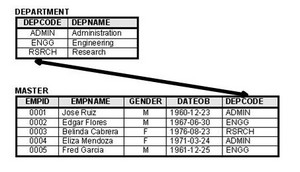
Two tables can be related if each contain a column that stores similar data elements. The two tables can be linked through these columns to enable data from both tables to be retrieved. In an example shown in the embedded figure, the DEPARTMENT and MASTER tables are related and can be linked through the column DEPCODE which both tables have.
Options for the Beginning Learner
A serious beginning learner needs to work on one among several commercial or free RDBMS. In environments where these are available and can be easily obtained or accessed, a beginner has the option as to what RDBMS to start working on. However, in other environments such as in less equipped rural villages or towns, learners have to make do with what is available.
The distribution of personal computers has trickled down to even the rural areas in the world, usually together with the Windows Operating System and Microsoft Office application software suite. MS Access, an easy-to-use RDBMS, is bundled as part of Microsoft Office. It is thus one of the most available RDBMS to use for learning and application purposes.





Regis